

A-Z of Animation - The Ultimate Guide to All Your Questions!
Animation is one of the most creative, technical, and fast-evolving art forms in the world and naturally, it raises a lot of questions.
Whether you're a beginner curious about how animation works, a student exploring different styles, or a creator searching for the right tools, understanding the basics makes the journey much easier.
This guide brings together the most common animation FAQs, from “What was the first animation?” to “How do you make 2D, 3D, or AI animation?”
Each answer is explained in clear, simple terms so you can grasp the fundamentals, explore popular tools, understand workflows, and start creating your own animated projects.
Let’s jump in and break down the most frequently asked questions about how animation works.
- Definitions & Core Concepts
- Process, Skills & Tutorials
- History of Animation
- Cost, Time & Production FAQs
Definitions & Core Concepts
Animation Types & Styles
Animation is the process of creating the illusion of movement by displaying a sequence of individual images, called frames, in rapid succession.
These frames can be hand-drawn, computer-generated, photographed, or digitally produced, making animation a broad art form that spans 2D, 3D, stop-motion, and modern CGI techniques.
2D animation is the process of creating movement in a flat, two-dimensional space using drawings, illustrations, or digital graphics.
Characters and objects are designed with height and width but no depth, giving them a stylized, graphic look.
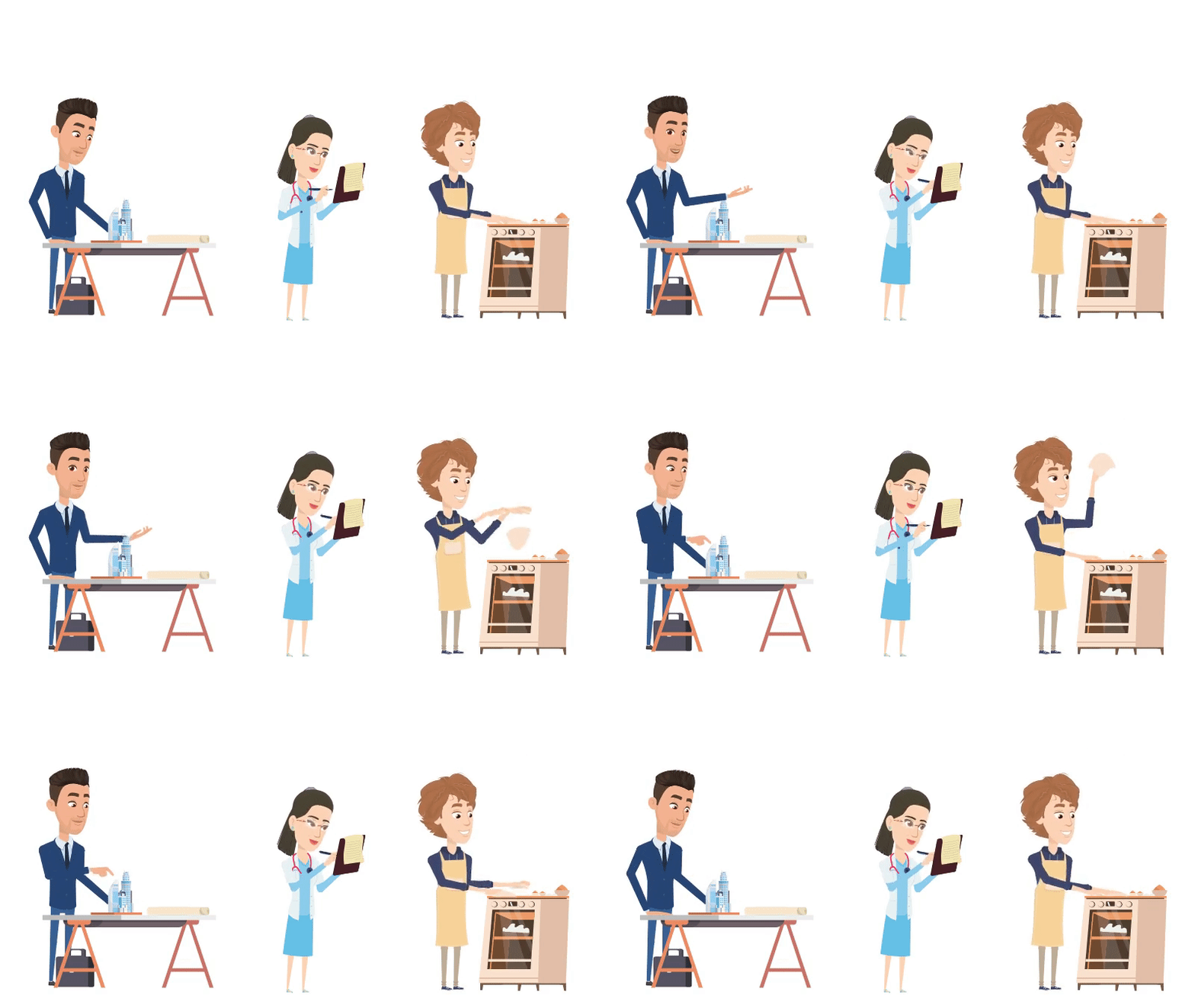
(These actions are made with a single click using Animaker)
2D animation can be created through hand-drawn frames, digital drawing apps, cut-out animation with layered elements, motion graphics, and vector-based software workflows.
2D animation is widely used in cartoons, explainer videos, marketing content, web animations, and mobile apps.
3D animation creates motion using three-dimensional digital models.
These models can be rotated, lit, textured, and posed just like real objects, allowing animators to control every aspect of how they look and move.
The 3D workflow typically involves modeling, rigging, animating, lighting, and rendering to produce polished visuals with depth and realism.
This style is widely used in films, TV shows, games, advertising, architecture, and product design because it delivers cinematic-quality graphics and lifelike motion.
4. What is CGI Animation
CGI (Computer-Generated Imagery) animation is the process of creating characters, environments, and visual effects using 3D computer graphics.
Artists build digital models, apply textures, rig them with virtual skeletons, and animate their movements using specialized software.
CGI is known for its realism and flexibility, making it a staple in animated films, visual effects, video games, advertising, and virtual production.
It allows creators to craft detailed worlds and lifelike characters that would be difficult or impossible to achieve through traditional methods.
5. What is stop motion animation
Stop-motion is an animation style in which objects are physically moved frame by frame and photographed at each position.
When these photos are played in sequence, the objects appear to move on their own, creating smooth, lifelike motion.
This technique is used with clay models, puppets, toys, or everyday objects to produce a tactile, handmade animation style.
6. What is claymation animation
Claymation is a type of stop-motion animation where characters and objects are sculpted from clay or similar malleable materials.
Animators then move the clay model in minute changes and photograph each position so that when played back, these images create a smooth motion of the clay.
This type of animation is known for its handmade look and is used in films like Wallace and Gromit and Coraline.
7. What is cut out animation
Cut out animation refers to a technique where characters and objects are created from materials like paper or fabric and moved frame by frame to simulate motion.
Traditional cut-out animation involves manually repositioning physical pieces, while modern workflows use digital rigs that let creators move limbs, faces, and props with puppet-like controls.
Because it uses pre-made pieces instead of full redraws, cut-out animation is faster than frame-by-frame animation while still offering expressive movement.
8. What is rotoscope animation
Rotoscope animation is a technique in which animators trace over live-action footage frame by frame to create animated effects.
The process starts with filming real actors or objects, then using each frame as a reference to draw the animated version.
Originally done with a device called a Rotoscope, the technique is now done digitally in modern software.
Rotoscoping combines natural human motion with artistic styling, making it popular in films, music videos, and visual effects.
9. What is traditional animation
Traditional animation is a hand-drawn process where each frame is illustrated individually on paper or transparent cels.
These drawings are then photographed and played in sequence to create motion.
Because every frame is crafted by hand, the process is meticulous and time-intensive, but it produces a uniquely organic look.
Classic Disney films and early cartoons are iconic examples of traditional animation.
10. What is flash animation
Flash animation refers to 2D animations created using Adobe Flash (now Adobe Animate), known for its vector-based artwork and easy timeline controls.
It became hugely popular in the early internet era because Flash files were lightweight and loaded quickly on websites.
Flash became the go-to tool for web cartoons, banner ads, and interactive games.
Although Flash is no longer used, its distinctive, snappy animation style still influences modern digital content.
11. What is digital animation
Digital animation is a broad term for animations made using computers, tablets, or digital software.
It covers everything from 2D motion graphics to 3D character animation and special effects.
Digital tools make it easier to edit, animate, and refine scenes without restarting from scratch.
It’s widely used across entertainment, marketing, education, and online content.
12. What is computer animation
Computer animation refers to any animation created with digital tools or software rather than hand-drawing every frame.
It allows animators to create complex movements, visual effects, and realistic scenes more efficiently.
Both 2D and 3D animation workflows rely heavily on computer-based techniques today.
From blockbuster movies to YouTube intros, most modern animation is created using computer animation.
13. What is cell animation
Cel animation is a traditional technique where characters are drawn on transparent sheets called cels.
These cels are placed over painted backgrounds and photographed frame by frame.
It allowed studios to reuse backgrounds and speed up production. Many classic cartoons were created using cel animation.
14. What is frame by frame animation
Frame-by-frame animation is a method where each frame is drawn or adjusted individually, allowing animators full control over motion.
This technique produces fluid, expressive movement because every pose, stretch, and gesture is crafted manually.
It’s used in traditional hand-drawn animation and in digital tools that mimic classic workflows.
While time-consuming, frame-by-frame animation offers a unique handcrafted feel that’s often used for character-driven scenes, effects, and stylized sequences.
Animation Techniques & Principles
15. What is rigging in animation
Rigging is the process of building a digital skeleton for a character or object.
This skeleton is made up of joints, bones, and controllers that define how different parts can bend, rotate, and move.
Rigging lets animators pose and animate characters without adjusting the underlying model frame by frame.
It’s an essential step in 3D animation and in certain 2D animation tools that use bone or puppet rigs, enabling natural movement, expressions, and complex actions.
16. What is tweening in animation
Tweening (short for in-betweening) is the process of generating frames between two key poses.
Instead of drawing or adjusting every frame manually, tweening fills the motion gap and creates a smooth, continuous transition.
This speeds up production, ensures smoother motion, and helps animators focus on defining strong key poses rather than every individual frame.
17. What is keyframe animation
Keyframe animation is a technique where animators create the main poses or “key” moments of a movement.
The frames between these poses, called in-betweens, are filled in manually or automatically by software.
By setting these key moments, animators control the timing, pacing, and overall flow of the movement.
It’s widely used in both 2D and 3D workflows, from cartoons to complex character animation.
18. What is easing in animation
Easing refers to the speed up or slow down motion at the beginning or end of an action, instead of moving at a constant pace.
By easing in (starting slow) and easing out (ending slow), animations feel more natural and physically believable.
It’s used to mimic real-world movement, like a car gradually accelerating or a hand slowing before stopping at a precise point.
Easing is fundamental in both character animation and motion graphics, helping transitions feel smooth, appealing, and lifelike.
19. What is squash and stretch in animation
The Squash and Stretch is the first principle of the 12 principles of animation. It is a technique that exaggerates the motion to convey an object’s weight, flexibility, and hardness.
This technique makes the animation comical when it is exaggerated to a degree.
For example, in Tom and Jerry, when Tom crashes into a wall, and his body compresses and expands, that’s Squash and Stretch in action.
20. What is timing in animation
Timing in animation refers to how long an action takes and how many frames are used to express it.
Good timing determines the weight, emotion, speed, and believability of a movement; for example, a heavy object falls more slowly and impacts harder than a light one.
Timing also controls comedic beats, dramatic moments, and scene pacing, guiding how audiences experience the story.
21. What is staging in animation
Staging is the principle of clearly presenting an idea, action, or scene so viewers instantly understand it.
It uses composition, camera angles, posing, and timing to guide the viewer's attention.
Good staging removes confusion and highlights the most important part of a scene.
It ensures that every moment supports the story and is visually readable.
22. What is appeal in animation
Appeal is one of the 12 principles of animation. It refers to how visually inviting, charming, or interesting a character, prop, or scene appears to the viewer.
The appeal comes from clear expressions, confident posing, and personality-driven actions that instantly communicate who a character is.
It’s not about making characters cute. Villains like Scar from The Lion King are memorable because their movements, attitude, and presence are compelling to watch.
Appeal helps the audience connect with the performance, understand emotions quickly, and stay invested in the story.
23. What is solid drawing in animation
Solid drawing is one of the 12 principles of animation and focuses on ensuring characters feel three-dimensional and believable.
It encourages animators to understand weight, volume, anatomy, balance, and perspective, even when working in 2D.
Solid drawing helps characters hold consistent structure as they move, preventing them from looking flat or distorted.
24. What is morphing in animation
Morphing is an animation technique where one image or object smoothly transforms into another through gradual shape and color changes.
It works by generating intermediate frames that blend the start and end visuals, creating a seamless transition.
This effect is often used to switch between characters, faces, logos, or abstract shapes.
25. What is a frame in animation
A frame is a single static image or a drawing within an animation sequence. When many frames play in rapid succession, they create the illusion of movement.
In traditional animation, each hand-drawn illustration counts as one frame, while in digital animation, each frame is a separate image on the timeline.
The number of frames used per second (FPS) also affects how smooth or stylized the animation appears.
26. What are the 12 principles of animation
The 12 principles of animation are foundational techniques introduced by Disney animators Ollie Johnston and Frank Thomas.
They include - squash and stretch, anticipation, staging, straight-ahead & pose-to-pose, follow-through & overlapping action, slow-in & slow-out, arc, secondary action, timing, exaggeration, solid drawing, and appeal.
These principles guide how characters move, react, and perform on screen.
They are used in every form of animation, from hand-drawn to 3D and motion graphics.
Tools, Software & Apps
27. What is the best animation software
The best animation software depends on your goals, skill level, and the type of animation you want to create.
Tools like Animaker are great for beginners and quick video creation, Blender is ideal for 3D animation and VFX, and Adobe Animate works well for 2D and interactive content.
Professional studios may also use tools like Toon Boom Harmony for 2D production or Maya for high-end 3D work.
Ultimately, the “best” software is the one that matches your workflow, style, and project requirements.
28. What is the best animation app
The best animation app varies based on your device and the kind of animation you want to make.
Apps like Animaker offer easy cloud-based creation, RoughAnimator supports frame-by-frame drawing, and FlipaClip is popular for hand-drawn 2D animation on mobile.
Some apps focus on beginners, while others offer advanced controls for experienced animators.
The best choice depends on your workflow, whether you prefer drawing, templates, or drag-and-drop animation.
29. What is the best AI animation generator
The “best” AI animation generator depends on your needs, style, and workflow.
Tools like Animaker, Adobe, Steve AI, and InVideo are popular for creating animations.
Some focus on characters, others on motion graphics, and others on realistic video-style output.
Choose based on ease of use, quality of results, and whether you prefer 2D or 3D video outputs.
30. What animation software does Disney use
Disney uses a combination of industry-standard tools and proprietary in-house software.
Autodesk Maya is the primary software for 3D animation, used for character movement, layout, and overall scene work.
For sculpting and high-detail character modeling, Disney artists rely on ZBrush, while Houdini is used for complex effects like smoke, fire, water, and destruction.
Disney also uses its proprietary Hyperion renderer for lighting and final image quality, enabling the studio’s signature cinematic look.
31. What animation software should I use
That depends on your goals, skill level, and the animation style you want to create.
Beginners often start with Animaker, Toon Boom Harmony Essentials, or Adobe Animate for 2D.
For 3D, Blender is a free and powerful option, while Maya and Cinema 4D are industry-grade choices.
Pick software based on ease of use, available tutorials, and whether you need 2D, 3D, or motion graphics.
32. Which image file format supports animation?
GIF is the most widely known image format that supports animation. WebP also supports animation with better compression and quality. APNG is another animated format compatible with many browsers.
These formats display multiple frames in a single image file.
Concept Distinctions
33. What is the difference between anime and animation
Animation is a broad term that refers to any technique that creates movement using a sequence of images, including 2D, 3D models, stop-motion, and more.
Anime, on the other hand, is a specific style of animation that originated in Japan and is known for its distinct art style, expressive characters, and storytelling conventions.
While animation is a global medium with many techniques, anime represents one cultural and artistic style within it.
So, all anime is animation, but animation includes far more styles beyond anime.
34. What is the difference between 2D and 3D animation
The difference between 2D and 3D animation lies in depth and visual style.
2D animation has flat, two-dimensional characters and scenes, focusing on height and width.
3D animation builds characters and environments in a three-dimensional space, allowing for realistic textures, lighting, and camera movement.
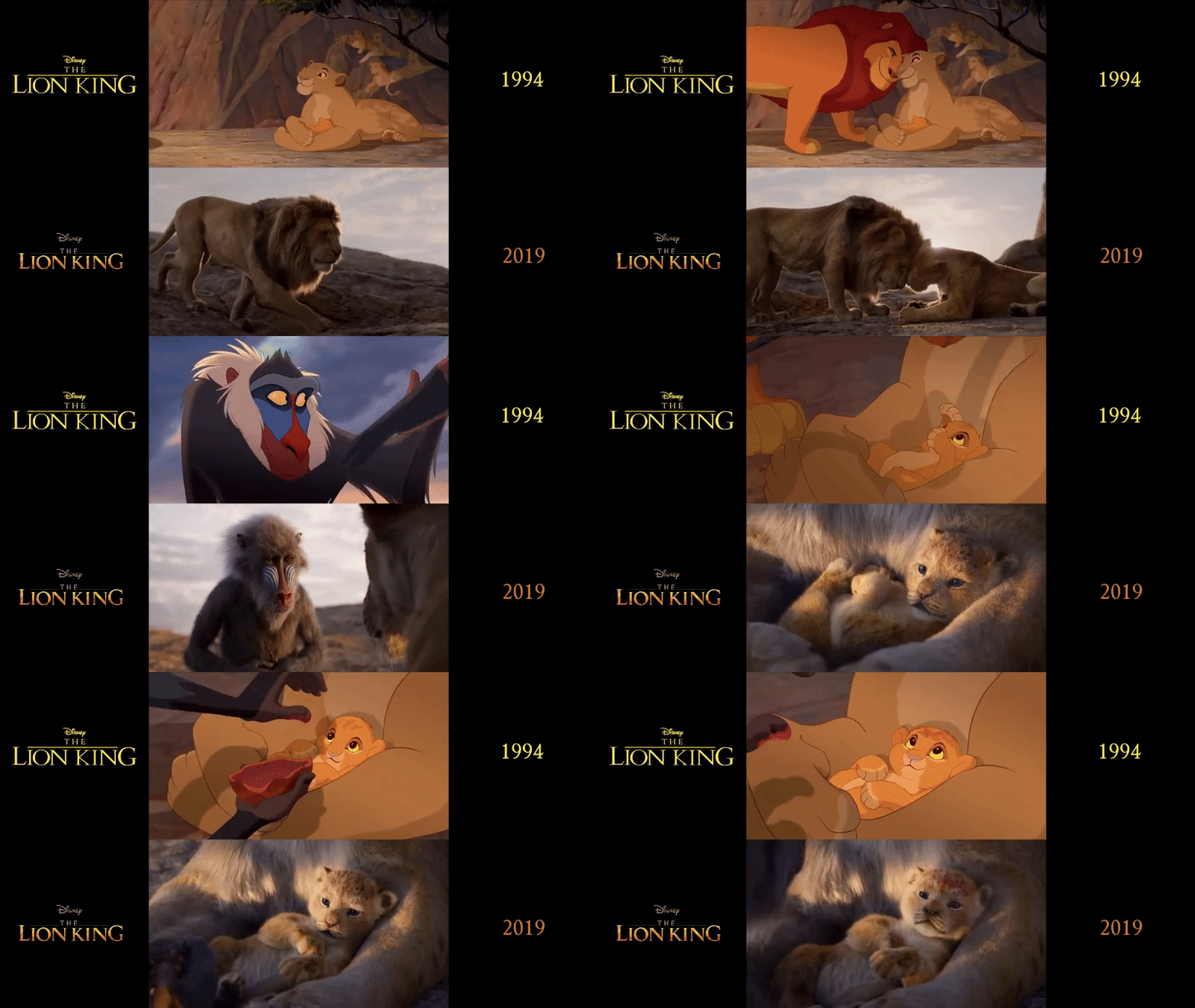
2D is commonly used in cartoons and explainer videos, while 3D is used in films, games, and realistic simulations.
Overall, 3D feels more immersive, while 2D is simpler and more stylized.
35. Is 3d animation easier than 2d
Neither is “easier”. They’re challenging in different ways. 3D handles movement and consistency for you once the rigs are built. 2D requires drawing every pose manually, which is time-intensive.
Your skillset and workflow determine which feels simpler.
36. Is anime short for animation
Yes!
“Anime” comes from the English word “animation.” In Japan, it refers to all animated content, not just a specific style.
But globally, it’s used to describe Japanese-style animation. The word is shortened, but its meaning is culturally specific.
Process, Skills & Tutorials
37. How to learn animation
Begin by mastering the core principles of animation, including motion, timing, and character expression.
Experiment with small projects to apply what you learn, gradually increasing complexity as your skills improve.
Analyze professional animations to understand techniques, style, and storytelling choices.
Take advantage of online courses, tutorials, and community feedback to refine your craft.
Consistency, practice, and building a showcase of your best work are key to becoming a proficient animator.
38. How to get into animation
Start by learning the basics of drawing, motion, timing, and visual storytelling, even if you plan to work in 3D.
Choose a specialty (2D, 3D, motion graphics, text animation, etc.) and practice with beginner-friendly animation tools.
Create small projects regularly to build skills. Study professional animations, follow tutorials, and take online courses to strengthen your foundation.
As you improve, collaborate on projects, join communities, and apply for internships or freelance work to gain experience.
39. How to get better at animation
Improving at animation requires a mix of consistent practice, study, and critical observation.
Start by mastering the fundamentals, including timing, weight, spacing, and acting, through both short exercises and larger projects.
Analyze professional animations to learn how experts convey emotion, motion, and story, and try to replicate and experiment with these techniques in your own work.
Finally, seek constructive feedback, join communities, and collaborate on projects.
Experience and consistent learning are key to becoming a skilled animator.
40. How to use animation in design
Animation can enhance design by making interfaces, websites, and visuals more engaging and interactive.
Use motion to guide attention, highlight key information, or explain concepts clearly.
Even subtle effects like transitions, micro-interactions, and animated icons improve user experience and readability.
The key is to apply animation purposefully so it supports the design without overwhelming the audience.
41. How to make 2d animation
Making a 2D animation starts with planning your story, characters, and key actions.
In general, animators create keyframes showing major poses and then fill in the in-between frames to produce smooth motion.
Backgrounds, timing, and effects are added to enhance the scene and bring the story to life.
For beginners or those looking for a faster approach, tools like Animaker make it easy to create 2D animations without drawing skills.
You can customize characters, add scenes, and control movement directly in the platform. For a detailed step-by-step guide, check out our How to Make 2D Animation article.
42. How to make 3d animation
You can start learning 3D animation using tools like Blender, which offer extensive tutorials and community support.
Begin by creating digital models of characters, objects, or environments in the software.
Add a skeleton or rig to the models so they can move realistically, then define motion using keyframes or frame-by-frame adjustments.
Apply lighting, textures, and camera angles, then render the sequence into smooth animation.
43. How does 3d animation work
3D animation works by creating digital models of characters and objects in a virtual space, then rigging them with a skeleton so they can be posed and animated.
Animators move these rigs frame by frame or with keyframes to create lifelike motion. Lighting, textures, and camera angles are added to make scenes look realistic.
Finally, the computer renders each frame into a finished video, combining all visual elements.
44. How does computer animation work
Computer animation uses digital tools to create movement by generating images frame by frame.
Animators design characters, build scenes, and set key poses, while software fills in smooth motion between them.
Effects, lighting, and timing are then adjusted digitally to shape the final look.
The computer then renders all frames into a complete animation, ready for playback on any device.
45. How many frames per second in animation
Most animations play at 12 to 24 frames per second, depending on the production style.
Feature films usually animate “on twos,” meaning one drawing is shown for two frames at 24 fps.
Modern 3D animation and CGI typically run at a smooth 24 fps for cinematic release.
For web and games, frame rates can vary, but 24-30 fps is the most common range.
46. How to do stop motion animation
To do a stop motion animation, start by planning your story and creating characters or objects for your scenes.
Position them carefully, then take a photo for each small movement or change.
Play the images in sequence to see smooth motion, adjusting timing as needed.
Good lighting, a stable camera, and patience are key to high-quality stop motion.
47. How to storyboard an animation
Storyboarding is the process of visually planning an animation before production begins.
Begin by breaking your story into scenes and sketching key moments, focusing on character positions, camera angles, and essential actions.
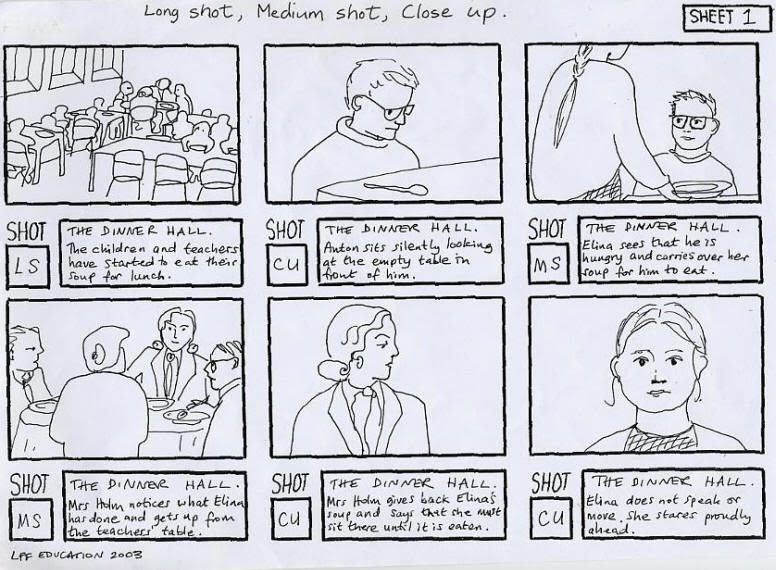
Include notes about timing, dialogue, and transitions to give animators a clear sense of pacing and motion.
The goal is not perfect art, but clear visual communication so the entire team understands how the story will unfold.
A detailed storyboard saves time in production by identifying potential problems and guiding scene composition, camera movements, and narrative flow.
48. How to lip sync animation
Lip sync animation is the process of matching a character’s mouth and facial movements to spoken dialogue so that speech looks natural and believable.
First, analyze the audio track, break it down into phonemes, which are the distinct sounds that make up each word, and then identify the key moments where the mouth shape changes.
Animate the character’s lips, jaw, and expressions to align with these sounds while also reflecting emotion, tone, and personality.
Fine-tune timing, gestures, and secondary facial movements to ensure the performance feels fluid and engaging.
For a faster, beginner-friendly approach, Animaker can automatically lip sync voiceovers with animated characters.
You can either upload your own voiceovers or generate them using AI, and the platform will sync the mouth movements and expressions to match the dialogue seamlessly.
49. How to make cartoon animation
Cartoon animation starts with planning, from developing the idea, designing characters, and sketching storyboards that outline the flow of the story.
Once your visuals are ready, you animate characters frame-by-frame or with rig-based systems, adding expressions, movement, and timing to bring them to life.
Sound effects, music, and voice-overs help strengthen the overall personality of the cartoon and make scenes more engaging.
If you want a simpler, beginner-friendly approach, Animaker’s Cartoon Maker offers ready-made characters, pre-built actions, and a drag-and-drop interface to create cartoon-style videos quickly and without prior animation skills.
50. How to create ghibli style animation
Ghibli-style animation is known for its rich, hand-crafted aesthetic, attention to detail, and emotional storytelling.
To create this style, study Ghibli films to understand their use of color, lighting, and character design, along with the naturalistic motion and subtle expressions that bring scenes to life.
For the actual animation process, many artists use OpenToonz - the same open-source tool adapted by Studio Ghibli.
The tool supports traditional hand-drawn workflows, digital ink and paint, and expressive 2D effects that help capture the signature Ghibli look.
You can get help from the available tutorials and documentation to learn the workflow, master the tool, and then gradually refine your animation to achieve a Ghibli-inspired style.
51. How to make a walking animation
A walking animation begins with understanding the basic walk cycle: contact, recoil, passing, and high-point poses.
In frame-by-frame animation, once these key poses are created, you animate the in-betweens to ensure smooth movement and natural weight shifts.
Pay attention to timing, spacing, and body balance so the character feels grounded and alive.
But if you want a faster, no-skill-required method, Animaker lets you generate ready-made walk cycles for custom characters with just a few clicks.
Check out the article to learn how to animate a walk cycle in detail.
52. How to make a YouTube intro animation
Creating a YouTube intro animation starts with defining your channel’s identity, like its tone, colors, logo, and message.
Come up with the idea of the short sequence by outlining how you want your brand to appear in the first few seconds, whether it’s dynamic, minimal, playful, or dramatic.
Use an animation tool to add motion to text, icons, or characters, and finish it with sound effects or music for impact.
To make this even easier, you can use Animaker’s YouTube Intro Maker, which provides ready-made templates, a drag-and-drop interface, and brand-friendly customization options.
53. How to make AI animation
Making AI animation begins with deciding the type of animation you want if it's character-driven, text-to-animation, or image sequences.
You typically start by providing a prompt, script, or storyboard that the AI can interpret to generate scenes, movements, and visuals.
Modern AI tools can create characters, animate them, add voices, and even produce entire videos from text, making the process much faster than traditional methods.
To simplify this further, Animaker’s AI Animation Maker lets you generate videos from simple prompts, auto-create scenes, add AI characters, and produce complete animations without manual keyframing.
54. How do you make an animation character?
Creating an animation character usually starts with brainstorming the character’s personality, role, and visual style.
Once the idea is clear, artists sketch different versions to explore shapes, expressions, and proportions.
The final design is then refined, colored, and prepared for animation - either through 2D design, rigging, or 3D modeling, depending on the medium.
If you prefer an easier, beginner-friendly method, Animaker’s Avatar Maker lets you create fully customizable animated characters in minutes, with options for hairstyles, outfits, facial features, and even personalities.
55. How hard is animation
Animation can be challenging because it requires a mix of artistic skill, technical knowledge, and a lot of patience.
Every movement, expression, and transition must be animated carefully, which can make the process time-consuming.
Learning the basics is accessible, but mastering timing, acting, physics, and storytelling takes practice.
It’s demanding but incredibly rewarding for those who enjoy creating worlds and characters from scratch.
History of Animation
56. What was the first animation
The first widely recognized animation is Fantasmagorie (1908), created by Émile Cohl using a series of hand-drawn images.
Cohl drew around 700 individual frames on glass plates, adjusting each with small changes to create an illusion of movement.
Its iconic chalkboard style came from filming black ink on white paper and then reversing the footage during processing.
Fantasmagorie is considered the beginning of traditional hand-drawn animation on film.
57. When was 3d animation invented
The roots of 3D animation trace back to the 1960s, when computers first began generating simple shapes.
By the 1970s, researchers produced early 3D wireframes and shaded models that hinted at modern CGI.
Major progress came in the 1980s with short films like Pixar’s The Adventures of André & Wally B.
Its true milestone moment came with Toy Story (1995), the first full-length film created entirely with 3D animation.
58. Who invented animation
Animation doesn’t have a single inventor, but early pioneers shaped the craft. Émile Reynaud introduced one of the first animated films in the 1890s.
Winsor McCay pushed the art forward with Gertie the Dinosaur (1914).
Together, these innovators laid the foundation for modern animation.
Cost, Time & Production FAQs
59. How much does animation cost
Animation costs vary widely depending on style, complexity, and production time.
Simple 2D videos may start at a few hundred dollars, while detailed 3D or character-heavy projects can run into thousands.
Costs increase with more scenes, custom characters, voiceovers, and effects.
Overall, animation is priced based on the time, skill, and resources needed to bring each moment to life.
60. How much does 2d animation cost per minute
2D animation can range from a few hundred to a few thousand dollars per minute, depending on the style and complexity.
Simple, minimal-motion videos sit on the lower end, while character-driven scenes with detailed art and smoother animation fall on the higher end.
Custom illustrations, scene count, revisions, and production quality also influence the price.
Overall, the cost reflects the time, skill, and artistry required to bring the visuals to life.
61. How long does animation take
Animation timelines vary widely, but both 2D and 3D take significant time because every action must be planned, created, and refined.
A short 2D animated clip may take days or weeks (if it is frame-by-frame), while a full-length 2D film can take several months to a year.
3D animation often takes even longer due to modeling, rigging, lighting, and rendering, with feature-quality shots sometimes requiring weeks for just a few seconds of polished footage.
Overall, animation, whether 2D or 3D, is a time-intensive craft shaped by complexity, style, and the size of the team involved.
62. Why is animation so expensive
Animation is labor-intensive.
Each frame, every movement, and expression must be created manually.
Skilled teams handle design, modeling, storyboarding, rigging, and effects, which adds time and cost.
High-end tools, software, and hardware for rendering also increase production expenses.
Overall, the handcrafted visuals built from scratch are what make it expensive.
63. Is 3d animation cheaper than 2d
Not always. It depends on style, complexity, and production scale.
3D has higher upfront setup costs (rigging, modeling, texturing). But once rigs are built, producing multiple scenes can be faster.
Simple 2D may be cheaper, but detailed frame-by-frame isn’t.
64. Is animation more expensive than live action
Often, yes, because animation requires creating everything from scratch. Live action benefits from real locations, lighting, and natural motion. Complex animated scenes can take weeks to render and polish.
But simple animated videos can be cheaper than high-end live-action production.
***
These were the most common questions people ask about animation, and we hope the answers gave you a clearer picture of how it all works. Keep experimenting, learning, and pushing your creativity forward.

![How to make 3D animation with Animaker? [Master 3D as a Beginner]](https://www.animaker.com/hub/wp-content/uploads/2026/09/Small.jpg)